
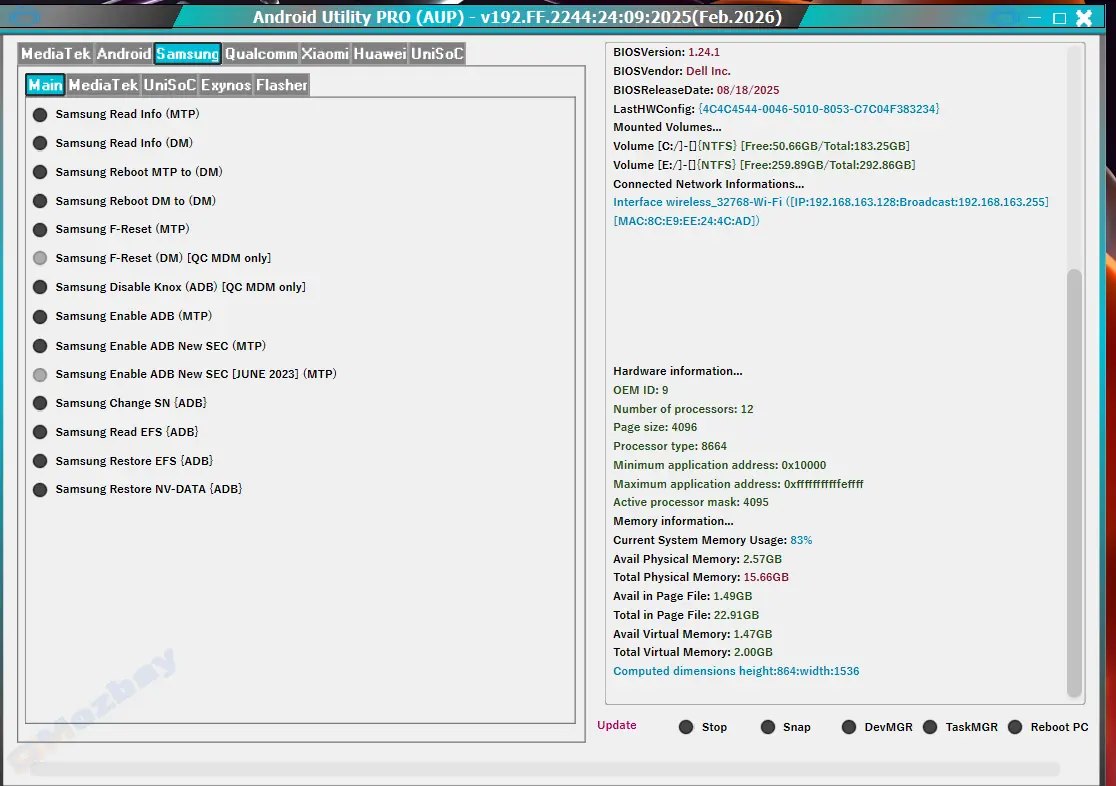
Android Utility Tool – Ultimate Multi-Function Android Solution
The Android Utility Tool is an advanced all-in-one software designed for Android technicians, mobile engineers, and smartphone users who want to perform system-level repairs easily. Whether you need to unlock a phone, remove FRP, fix IMEI, or flash firmware, this tool brings every essential Android service into one clean and user-friendly interface.
Unlike other complex utilities, Android Utility Tool provides a one-click experience for many advanced tasks — making it perfect for beginners and professionals alike.
FRP Bypass Support – Remove Factory Reset Protection on most Android brands, including Samsung, Infinix, Tecno, Vivo, and Xiaomi.
Unlock Bootloader – Easily unlock or relock bootloaders to customize or root your phone.
IMEI Repair & Backup – Fix corrupted IMEI numbers or back them up securely before firmware flashing.
Firmware Flashing – Flash stock ROMs or custom ROMs with ease, compatible with MediaTek, Qualcomm, and SPD devices.
Rooting and Debugging Tools – Enable root access and ADB/Fastboot commands for full control.
User-Friendly Interface – Clean, lightweight, and mobile-friendly layout for easy navigation.
Regular Updates – Stay ahead with new versions supporting the latest Android devices and security patches.
One Tool for All Brands: Save time and space by using one software for Samsung, Tecno, Infinix, Itel, Xiaomi, Oppo, and more.
Free and Safe: 100% malware-free, ensuring device and data security.
Fast Repair: Perform advanced operations in seconds using built-in automation.
No Technical Skills Needed: Simple GUI makes it ideal even for non-experts.
Active Support Community: Access guides, tutorials, and updates from the developer community.
How to Install and Use Android Utility Tool
Download the latest version of Android Utility Tool from a trusted source.
Extract the ZIP file to your computer using WinRAR or 7-Zip.
Run the setup file and install the program.
Connect your Android phone via USB with debugging enabled.
Select Function: Choose from unlock, FRP, flash, or IMEI options.
Execute: Click the “Start” or “Run” button to perform the operation.
Within a few minutes, your device will be fixed, unlocked, or flashed — all without complicated commands.
Call to Action
Experience the power of the Android Utility Tool today! Download it now to unlock, repair, or flash your Android phone quickly and safely.
Android Utility Tool is an all-in-one Android repair and unlocking software that simplifies complex mobile operations. It supports FRP bypass, IMEI repair, firmware flashing, rooting, and more. With a clean interface and fast performance, it’s ideal for both beginners and mobile technicians. Compatible with major brands like Samsung, Infinix, Tecno, Vivo, and Xiaomi, this tool ensures safe and reliable device servicing. Download Android Utility Tool today to fix, unlock, or flash your phone in just minutes.
1. What is Android Utility Tool used for?
The Android Utility Tool is used for repairing, unlocking, flashing, and managing Android devices. It supports FRP removal, IMEI repair, and more.
2. Is Android Utility Tool free to download?
Yes, the Android Utility Tool is free to download and use. It offers professional-level Android repair features without any hidden charges.
3. Can I use Android Utility Tool on any Android phone?
Absolutely. The tool supports almost all major Android brands including Samsung, Tecno, Infinix, Itel, Vivo, and Xiaomi, making it highly versatile.
This item is available for free download. You may download and use it according to the free item policy.
DownloadLast Update:
Oct 21, 2025 09:39 AM
Published:
Oct 21, 2025 10:25 AM
Category:


